SparkReceipt Review (2026): AI Receipt Scanner & Expense Tracker — Pricing and Feedback
Research-based review. We haven't tested SparkReceipt hands-on yet. This review is built from the vendor's documentation and pricing page and from public feedback by real users on Trustpilot, all cited below. How we review
Disclosure: Every review states how it was researched. If you buy through our links we may earn a commission at no extra cost to you — this never affects our verdicts. How we make money.

SparkReceipt is an affordable, well-reviewed expense tracker for freelancers and small businesses: snap or forward receipts, let AI extract the details, then export to QuickBooks, Xero or your accountant. Users rate it 4.5/5 on Trustpilot, most of it recent, and praise its fast scanning. Plans start at $5.75/month billed yearly with a 7-day free trial. AI categorisation still needs a quick review, and the Pro plan's 50-document limit is tight for busier businesses.
Best for
- Freelancers and sole traders who hate managing receipts
- Small businesses that send records to an accountant
- US self-employed users preparing Schedule C
Skip it if
- Larger companies needing full spend management and approvals
- Businesses with mostly faded or handwritten receipts
Pros
- Fast AI extraction from receipts, invoices and bank statements
- Email forwarding, live bank feeds and mileage tracking (GPS or manual)
- Integrations with QuickBooks Online, Xero, Zapier, Make and an API
- Exports to PDF, Excel, CSV and ZIP in 190 currencies; Schedule C on Elite
- Low price: from $5.75/month billed yearly; accountant joins free
- 4.5/5 on Trustpilot from 52 reviews, most in the last 12 months
Cons
- AI categorisation isn't always accurate — expect to review entries
- Pro plan capped at 50 documents a month (bank statements count)
- Line-item extraction and AI rules require Elite
- No free plan (7-day trial only)
What is SparkReceipt?
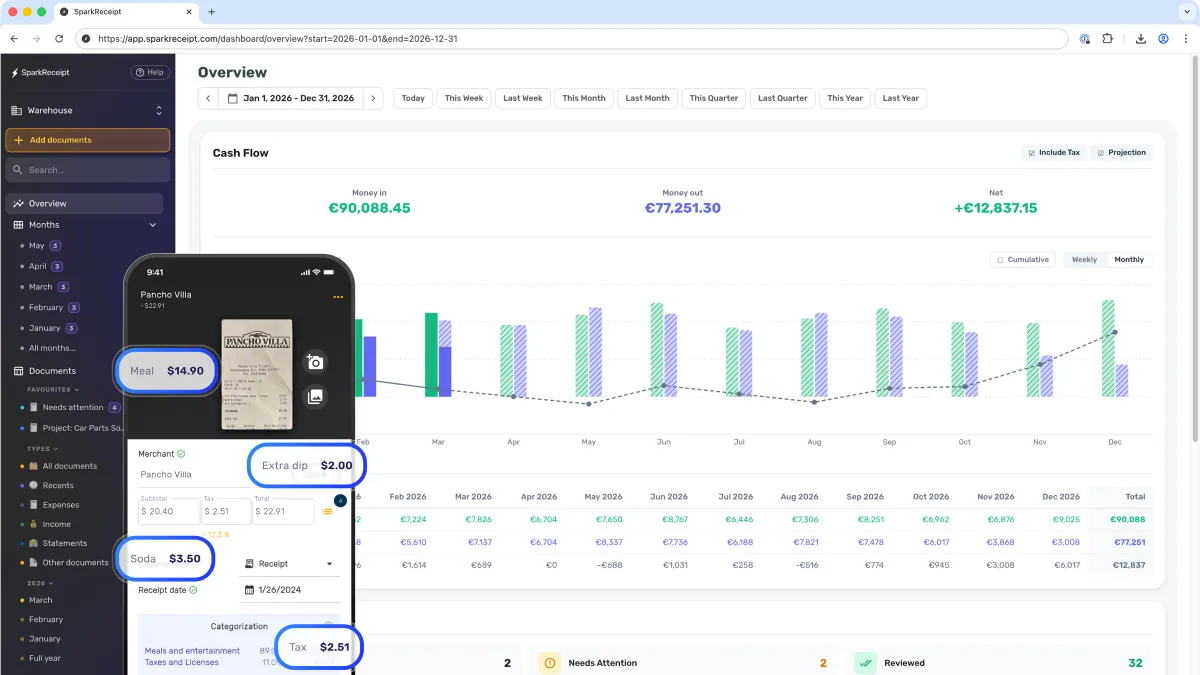
SparkReceipt is an AI receipt scanner and expense tracker for freelancers and small businesses. Photograph a receipt, forward an emailed invoice or connect a bank feed, and its AI pulls out the merchant, date, amount, tax and category. Expenses are organised for bookkeeping and tax time, and can be exported or synced to your accounting software.
Key features
- AI data extraction from receipts, invoices and bank statements (line items on Elite).
- Email forwarding inboxes and live bank feeds.
- Mileage tracking by GPS or manually, with per-diem support; Elite can start trips automatically when your phone connects to your car.
- Integrations: QuickBooks Online, Xero, Zapier, Make, Pabbly, webhooks and API.
- Exports: PDF, Excel, CSV and ZIP in 190 currencies; Schedule C and templates for Sage, DATEV and Wave on Elite.
- Web, iPhone and Android apps on one account; accountants join free.
SparkReceipt pricing (November 2026)
| Pro | Elite | |
|---|---|---|
| Monthly billing | $6.90/month | $12.90/month |
| Annual billing | $69/year ($5.75/month) | $129/year ($10.75/month) |
| Documents | 50/month | Unlimited (fair use) |
| Email inboxes / bank feeds | 1 / 1 | Several |
| Line-item extraction, AI rules | — | Yes |
| Extra users | $1/month each | $1/month each |
Source: sparkreceipt.com/pricing, checked November 16, 2026. 7-day free trial on both plans. Prices exclude VAT/GST; app-store prices are set separately.
What real users say
SparkReceipt scores 4.5/5 on Trustpilot from 52 reviews, and unusually, 47 of them are from the last 12 months, so the feedback is current. The company replies to every negative review, typically within a day.
Users most often praise fast, reliable scanning — some capture every receipt at the point of payment — plus an intuitive interface and time saved at tax time. The main reservation is that AI categorisation isn’t always right, so you’ll still review entries; faded or illegible receipts are harder to read.
Who should use SparkReceipt?
Good fit: freelancers, sole traders and small businesses that want receipts captured instantly and handed to an accountant or accounting software with minimal effort.
Poor fit: larger companies needing approval workflows and corporate cards, and businesses whose receipts are mostly handwritten or faded.
Bottom line
SparkReceipt is a cheap, fast and well-reviewed way to stop losing receipts and speed up bookkeeping. Start the 7-day trial, scan a week’s worth of expenses, and check how accurate the categories are for your business — then choose Pro or, if you process more than 50 documents a month, Elite.
What real users say
Common praise
- Very fast, reliable receipt scanning — easy to capture at the point of payment
- Intuitive interface
- Saves time at tax time
- Responsive support; company replies to every negative review
Common complaints
- AI categorisation sometimes needs manual correction
- Faded or illegible documents are harder to read
Recurring themes summarised from the public reviews and discussions listed in our sources.
Frequently asked questions
How much does SparkReceipt cost?
On the website (November 2026): Pro is $6.90/month or $69/year ($5.75/month), and Elite is $12.90/month or $129/year ($10.75/month). Extra users are $1/month each, and your accountant joins free. App Store and Google Play prices may differ.
Is there a free trial?
Yes — Pro and Elite include a 7-day free trial. There's no free plan.
Does SparkReceipt integrate with QuickBooks and Xero?
Yes. Both plans integrate with QuickBooks Online and Xero, plus Zapier, Make, Pabbly, webhooks and an API.
What's the difference between Pro and Elite?
Pro covers 50 documents a month, one email inbox and one bank feed. Elite adds unlimited documents (fair use), multiple inboxes and bank feeds, line-item extraction, AI fields and rules, automatic car-trip mileage and extra export templates including Schedule C.
Can I get a refund?
Website subscriptions that started with a free trial can be refunded within 15 days of the trial ending. App Store and Google Play purchases are refunded through Apple or Google.